Achieving World-Class ITSM Support at Barts Health NHS Trust
Read the Success Story
 +44 (0)203 479 7900
 +1 612 416 2177
 +61 (0)2 8880 9500
 +64 (0)4 488 7481
We’ve introduced a new Service Catalog widget that showcases Service Actions and Bundles in a clean, modern layout designed for faster discovery. It enables users to quickly scan available options and navigate with consistent context—supported by search and breadcrumbing on the Browse Catalog page—reducing clicks, confusion, and overall effort.
We’re excited to introduce a series of major enhancements to Nano, our streamlined Analyst interface. This release focuses on a refreshed, modern look and feel, smarter navigation, and powerful workflow improvements that make every action faster and more intuitive.
We’ve reimagined Nano’s UI, giving it a cleaner design and reorganising key functions into a dynamic action toolbar. This makes navigating and performing actions far more efficient—keeping analysts focused on their work, not their tools. Nano continues to share many of the same capabilities as Core, while delivering them in a simplified, analyst-friendly format.
From the home screen, analysts can quickly view the latest news—both end-user updates and internal items. A new Pin to Top option ensures important notices always stay visible.
The call screen has been upgraded with a top-bar action panel, placing key actions—Assign, Save, Cancel—exactly where analysts need them. No more scrolling to the bottom of the page. We’re also introducing the Conversation Widget, mirroring what end users see in the Self-Service Portal. This sleek slide-out panel stays in view wherever you are on the screen, supporting email communication (with attachments) just as before. Calls can now also be linked directly from within the screen, making relationship management between calls even easier.
Managing workload in Nano is now more powerful than ever:
These options are now cleanly presented and only a couple of clicks away. Analysts will also benefit from Core-style workload and outstanding item views, replacing the previous tick-box and filter-based approach.
Searching in Nano has been supercharged. Analysts can now build search criteria as they type—available across all search areas. It’s fast, accurate, and efficient. And with a single click, you can copy the OData query—perfect for use with our new dashboarding tools or any external BI system.
We have redesigned the breadcrumb trail to make it cleaner, clearer, and more visible, helping analysts always understand exactly where they are within Nano. And other additional enhancements.
We’ve introduced several improvements to make designing screens smoother and more efficient:
Alemba’s robust Logic App integration with ServiceNow ensures a seamless flow of information between your Alemba Service Manager environment and ServiceNow service desk.
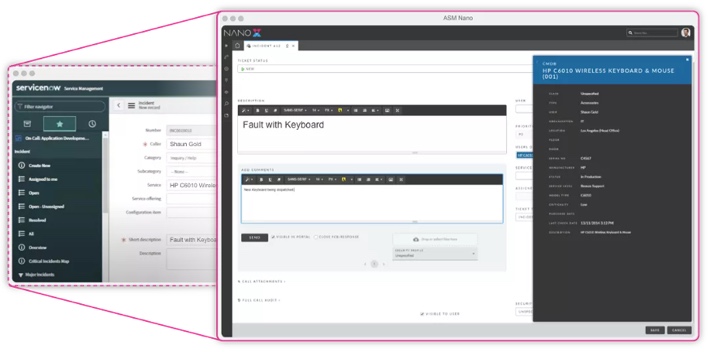
This allows you to create a unified IT Service Management environment, increasing efficiency by speeding up the flow of information and removing any double entry of data. This uses Real time Rest API calls to sync data, update and attachments between both systems.
A new enhancement to Auto Close Rules gives administrators greater control over how suspended Calls are managed. You can now choose to allow suspended calls to be automatically closed when they meet the defined rule criteria.
Previously, Auto Close Rules would exclude suspended calls entirely, even when a rule was configured for them—preventing teams from automating their closure. With this update, organisations can streamline call lifecycle management and reduce manual effort by including suspended calls in automated workflows.
Allow users to define conditions where specific types of suspended calls can be closed (e.g., "Suspended for more than X days").
Example rule:
If Suspended = True AND Suspended Duration > X days, allow auto-closure.
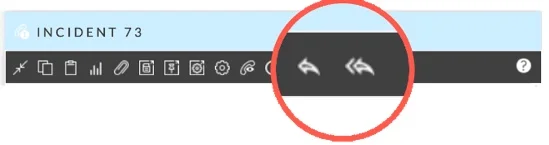
With this enhancement, new toolbar buttons for Email (Reply) and Email All (Reply All) will be introduced on the Call, Request, and Task Details screens ASM Core. These buttons will allow users to quickly open an email composition window—either to the primary user or to all relevant stakeholders (including CC Recipients and Followers)—directly from the toolbar.
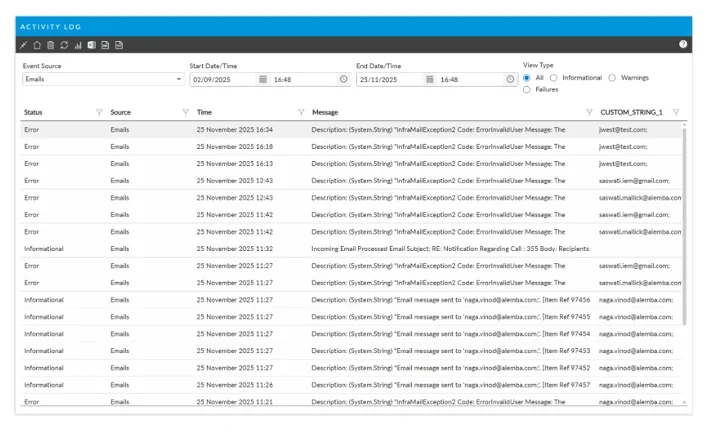
A new date/time operator has been added to the Email Activity Log, giving administrators the ability to filter events by specific periods within a day. This operator can be applied consistently across all Activity Log Events, enabling more granular searches and complete visibility into email activity. Even during peak usage, this enhancement ensures that all relevant log entries are easily accessible and actionable.
With this enhancement, administrators can configure the system to automatically add email recipients as either "Followers" or "Email Recipient" stakeholder types when sending emails. When the new setting is enabled, recipients will be assigned the selected role and granted the associated notifications and access. Followers will have full notification access and can manage followed entities from the portal, while Email Recipients will only receive manual notifications.
We’ve strengthened platform security and reliability with updated libraries and dependencies across the system. These improvements help protect against vulnerabilities, ensure compatibility with modern standards, and provide a more stable and secure experience for all users.
Fully aligned with WCAG 2.2 AA, the Self-Service Portal and Nano now deliver a more inclusive, consistent, and accessible experience for every user. Enhanced keyboard navigation, clearer focus states, and standardised interactions make our web interfaces easier and more intuitive for all. These updates strengthen compliance, reduce accessibility barriers, and ensure your organisation can support all users with confidence.
Book a walkthrough with our team and we will show you the features that matter to how you work.
Book a demo