
Achieving World-Class ITSM Support at Barts Health NHS Trust
Read the Success Story
 +44 (0)203 479 7900
 +1 612 416 2177
 +61 (0)2 8880 9500
 +64 (0)4 488 7481
Athena 26.11 delivers the feature our customers have asked for most. Configurable Closure Screens, the most voted for idea on the Alemba ideas portal, puts the call closure screens in the hands of your administrators, in Core and in Nano.
Alongside it, portal requests, inbound email and system administration all become more dependable. Upgrade from Athena 26.10 or earlier and those improvements apply straight away. Your closure screens stay exactly as they are until an administrator chooses to change them.
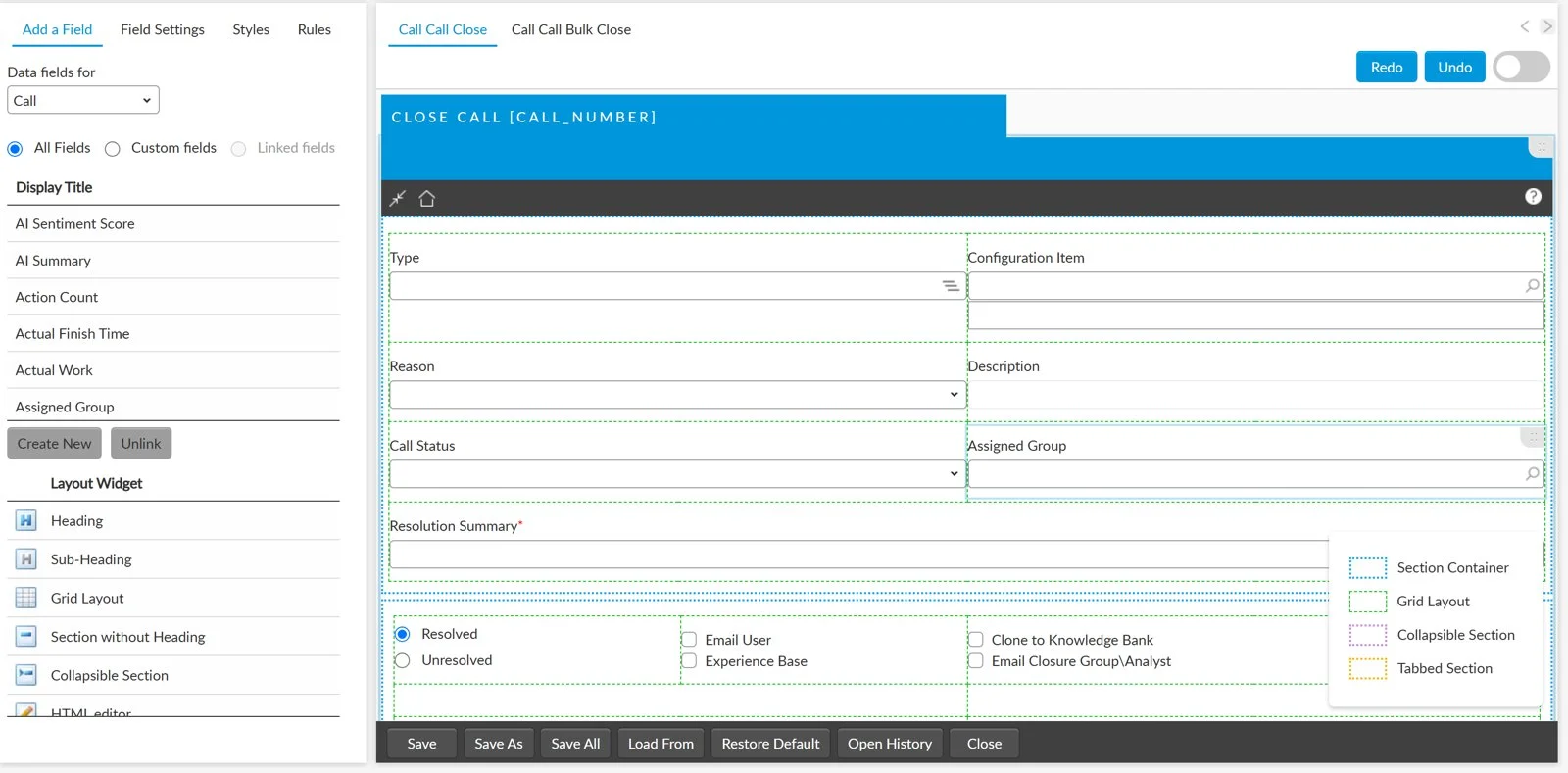
Administrators can now change the screens analysts use to close calls, using Screen Designer, the same tool they already use for other ASM screens. Your service desk decides what is captured at closure, without asking Alemba to change the product.
Capture a resolution summary every time, use the labels your team actually uses, and keep closure data consistent enough to report on.
The screens analysts use to close calls were fixed. There was no way to insist on a resolution summary at closure, and labels that didn't match your terminology couldn't be changed.
Administrators shape each closure screen in Screen Designer. Fields can be renamed, rearranged, made required or hidden, and each call type can have its own close screen.
| Screen | Used for | What you can change |
|---|---|---|
| Call Close | Closing one call in Core | Labels, layout, required and hidden settings, extra fields, and a version for each call type |
| Call Bulk Close | Closing several calls in Core | Labels, layout, required and hidden settings for the fields on the screen |
| Nano Call Close | Closing several calls in Nano | Labels, layout, required and hidden settings for the fields on the screen |
Closure always works. The information the system needs to close a call is protected, so a change to the screen can never stop calls being closed. When analysts close calls in bulk, the screen only offers fields that are safe to apply to every selected call, so no call loses its own details.
Make a Resolution Summary field required on Call Close, so every closed call records how it was fixed and resolution reporting has the data behind it.
Relabel One Liner as Resolution and make it required on Nano Call Close, so even a bulk close captures what was done.
Service desk managers get consistent closure data, and administrators make the change themselves.
Every request submitted from the Self Service Portal is logged, so customers can trust that pressing submit means their request has arrived.
Mailboxes on Exchange Server Subscription Edition (2025) can be read again, so inbound email keeps flowing into ASM.
Housekeeping jobs now finish what they start.
Athena 26.11 installs with the usual PowerShell script or the offline installer.
Book a walkthrough with our team and we will show you the features that matter to how you work.
Book a demo