
Achieving World-Class ITSM Support at Barts Health NHS Trust
Read the Success Story
 +44 (0)203 479 7900
 +1 612 416 2177
 +61 (0)2 8880 9500
 +64 (0)4 488 7481
Approvers can hand their approvals to a deputy, scoped by partition and bounded by start and end dates, so cover for annual leave no longer means handing over everything.
The delegator chooses exactly which partitions the deputy can act in, and the system will not let them grant access the deputy does not already hold.
Hand approvals to a deputy for the exact dates you are away, limited to the partitions they already work in, and let the delegation lapse on your return.
A deputy clears IT and Facilities approvals while HR approvals stay out of their reach entirely.
Managers get real cover, and auditors get a clean trail.
A new tool for promoting configuration between environments, such as test to production. Nothing changes in the target until a dry run has classified every object and you have approved it.
Objects are matched on readable identifiers rather than internal IDs, so existing items are updated instead of duplicated, and environments do not need to have been built the same way.
Choose the configuration you want to move and download it as a bundle.
Upload the bundle to the target environment.
Every object is classified as create, update, skip or blocked before anything is applied. Nothing changes until you decide to go ahead.
Available standalone. Config Portability ships within Athena 26.9 and can also be installed as a standalone module, so systems on older versions can use it without upgrading first.
Analysts can create, manage and share knowledge articles without leaving Nano, generating an article straight from the call they are working on.
An icon on the call screen generates an article from the call being worked, with the title and abstract pre-filled and the original call linked for traceability.
Knowledge security applies throughout. Users only ever see articles they are allowed to see, wherever the article surfaces.
A new Authentication section under System Administration brings SAML single sign-on and OAuth API client management together in one place.
Nothing changes for end users, whose sign-in is unchanged. This only affects where administrators manage authentication settings.
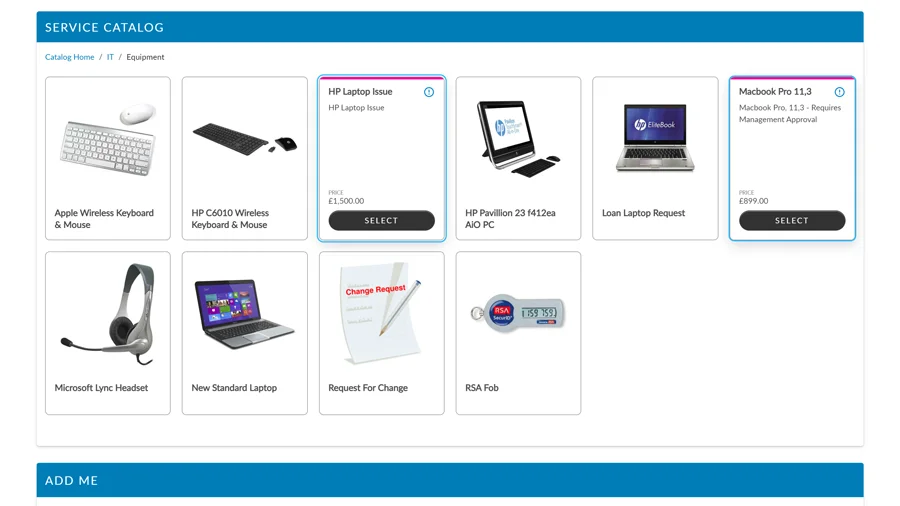
The Self Service Portal Service Catalog now renders every tile with one consistent card style, so cards in a row are always the same height whatever their type.
Each card shows an image and title at rest and reveals its detail on hover, keyboard focus or tap. Request, an information icon, and where configured price and quantity, are independent controls on the card.
Tile styling varied with the type of item being shown, so cards sitting in the same row could differ in height and in what they exposed.
Every tile uses the same card style. Cards in a row are always the same height whatever their type, and detail is revealed consistently on hover, focus or tap.
WCAG 2.2 AA. The catalog is fully keyboard operable and respects reduced-motion preferences.
This replaces the previous catalog layout on all portals. Image display mode and aspect ratio are configurable per item.
Administrators can now limit the Type Tier classification dropdown so that, when a Service is selected on a ticket, it shows only the options that are valid for that Service, across Core, Nano and the Self Service Portal.
Fewer misclassified tickets, cleaner reporting, and far less UNSPECIFIED noise.
All configured Type Tiers appeared regardless of which Service was chosen. In large environments this made it easy to select an incorrect classification, and distorted reporting with UNSPECIFIED entries.
Once enabled, the Type Tier list filters to only the options linked to the selected Service. Invalid choices are not shown.
In IPK Settings (Partitioned), set Service Linking to "Limit Type Tier".
On Service Details, open the "Limit Type to Service" tab and assign the valid Type Tiers for each Service.
Until this is configured, all Type Tiers remain visible, so nothing changes for a Service until you set it up.
| Scenario | Behaviour |
|---|---|
| New calls | With limiting enabled, only Type Tiers linked to the selected Service are shown. |
| Existing calls | Existing calls retain their recorded Type Tier. |
| Services with no links | All Type Tiers remain visible. Unchanged. |
Fully backwards compatible. Services with no configured links continue to show all Type Tiers. No existing tickets or configurations are affected on upgrade.
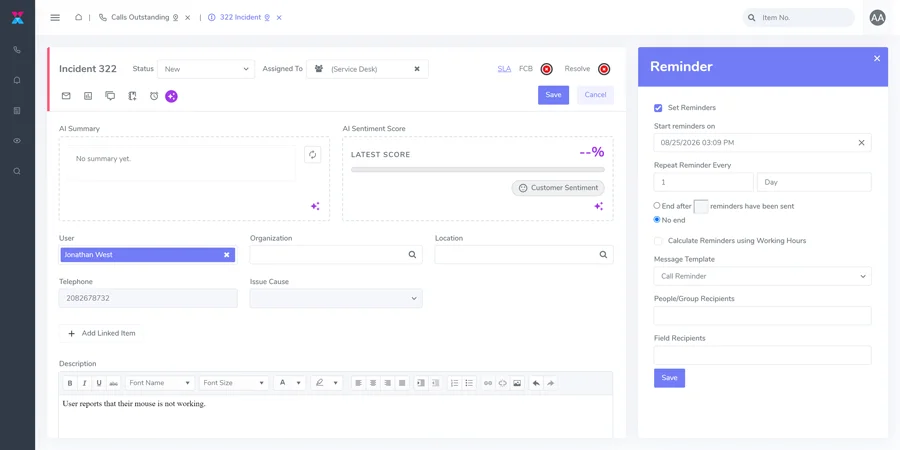
A reminders icon has been added to the Call, Request and Task toolbar in Nano. Clicking it opens the Reminders screen in a slide-out side panel, so the ticket stays in view while you schedule a recurring reminder.
Reminders previously meant leaving the ticket you were working on. In Nano they now open in a side panel, so the ticket stays in view.
With a Call, Request or Task open in Nano, select the reminders icon on the toolbar. The Reminders panel slides out from the side.
Enter a start date and time, then a repeat interval. Choose to end after a set number of reminders, or leave it running with no end date.
Set the recipients and the message the reminder carries. Both are controlled per reminder.
Calculate Reminders using Working Hours confines a repeating reminder to your configured working hours, so a daily chase does not fire overnight or at the weekend.
Set a reminder to repeat every two working days until the supplier responds, rather than relying on someone remembering to follow it up.
A weekly reminder on a change request keeps the assigned group checking in on work that spans a whole release cycle.
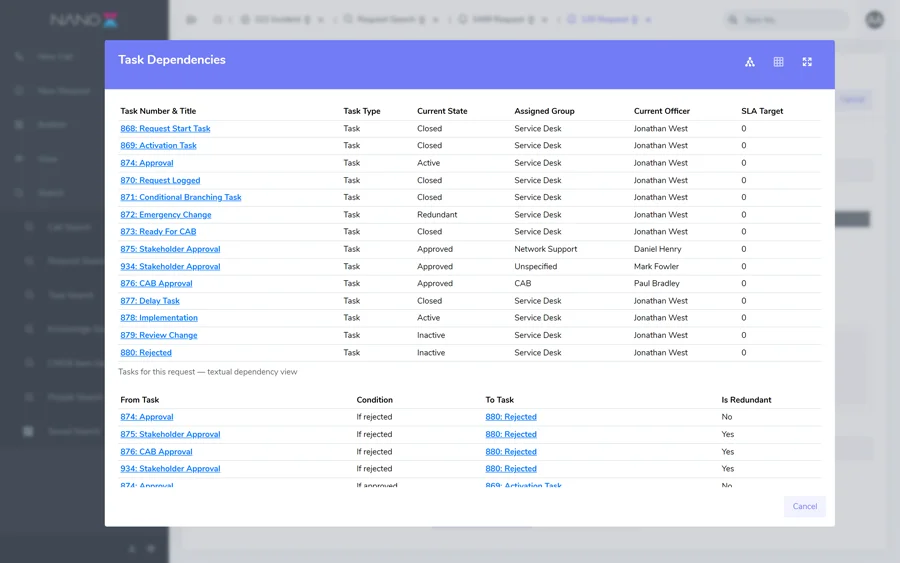
The task dependency diagram on a Nano request can now be viewed as a plain text list as well as a diagram, switched with a single icon.
An accessible alternative to the diagram. The list prints cleanly and works with screen readers and keyboard navigation, giving a shareable alternative to the visual workflow.
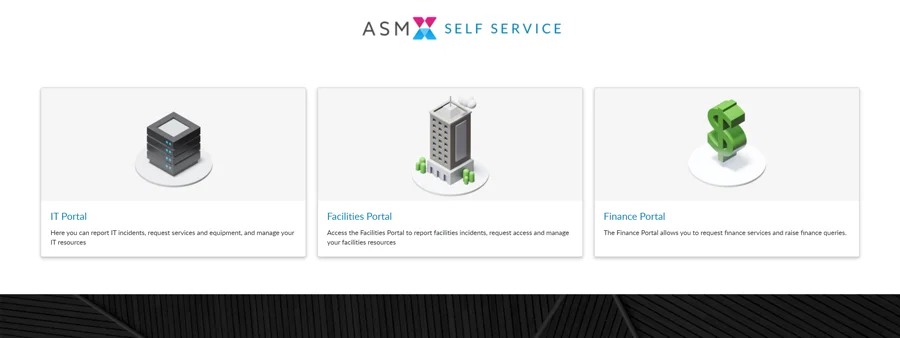
One ASM instance can now present several distinct self-service portals, each with its own branding, home page, options and partition scope, all administered in one place.
Users sign in to a shared Landing Page and move between the portals they are entitled to, holding a different role in each.
IT, HR and Facilities each get a portal that looks like theirs and shows only their services, without running separate systems.
A user signs in once at the shared Landing Page and moves between the portals they are entitled to, holding a different role in each.
The Azure DevOps Connector is now throughput and consumption aware, so synchronisation keeps up reliably at high volume.
Moving large numbers of work items risked syncs that failed or stalled and had to be recovered by hand.
The connector paces itself against the API rate limit and recovers from throttling on its own, so high-volume synchronisation keeps up without manual intervention.
Book a walkthrough with our team and we will show you the features that matter to how you work.
Book a demo